Guides
How to Convert CBR to PDF on a Mac Without the Headache

Someone on r/software went looking for a Mac app that turns CBR comics into PDFs. Drag in, click a button, done. He had a stack of old video game manuals stuck in a format his MacBook would not open, and he had already burned close to two hours on it before he gave up and asked strangers for help.
Two hours. To change what is basically a file extension.
That thread stuck with me, partly because I had already built the thing he was describing, and partly because the reason this eats an afternoon is genuinely dumb once you know what a CBR actually is. Short version, for anyone who just wants the answer: use a converter that can unpack RAR, since that is the only real obstacle here. The rest of this page is which one, and what I found when I tried to break them.
A CBR is not a comic format. It is a RAR archive with the pages sitting inside it as ordinary images, which is why Preview shrugs and every forum tells you to unpack it by hand.
The actual problem
Why your Mac refuses to open it
macOS unpacks zip out of the box and always has. RAR it will not touch, and a CBR is a RAR archive wearing a different extension, so double clicking one gets you a shrug from Archive Utility and nothing else. The file is fine. Your Mac simply never learned to read that container, and every comic app you download to fix it is quietly doing the unpacking for you.
CBZ is the same idea in a zip, which is why one file works and the next one stalls. Same comic, different wrapper, completely different afternoon.
Ten second check
Rename a copy to .rar and open it
The fast version
Ten comics in, ten PDFs out
This is my Mac, recorded in one take. Ten CBR files dropped in together, PDF picked once, and the batch saved to Finder. Nothing left the machine, because there is nowhere for it to go.
Everything runs on your Mac. No upload, no queue, no account to drag a file in.
Method
The ten archives I built to break it
Ten clean copies of the same file would have proved nothing, so I made a set with the specific defects real comic scans arrive with.
Unpadded filenames
page2 sorts after page10 in a plain alphabetical read. It is the single most common reason a converted comic comes out shuffled.
A nested folder
Scanners love burying the pages one directory deep. Plenty of tools find nothing and hand back an empty file.
Mixed page sizes
A double spread sitting next to a single page, which is where naive converters start cropping or stretching.
Grayscale manga
Single channel scans that a careless re-encode turns back into colour, tripling the size for no visible gain.
2400px pages
Big enough that a downscale would show. I wanted to know whether anything was being quietly resampled on the way through.
A forty page issue
The closest thing to a real book in the set, and the one that would expose a per-page memory leak if there was one.
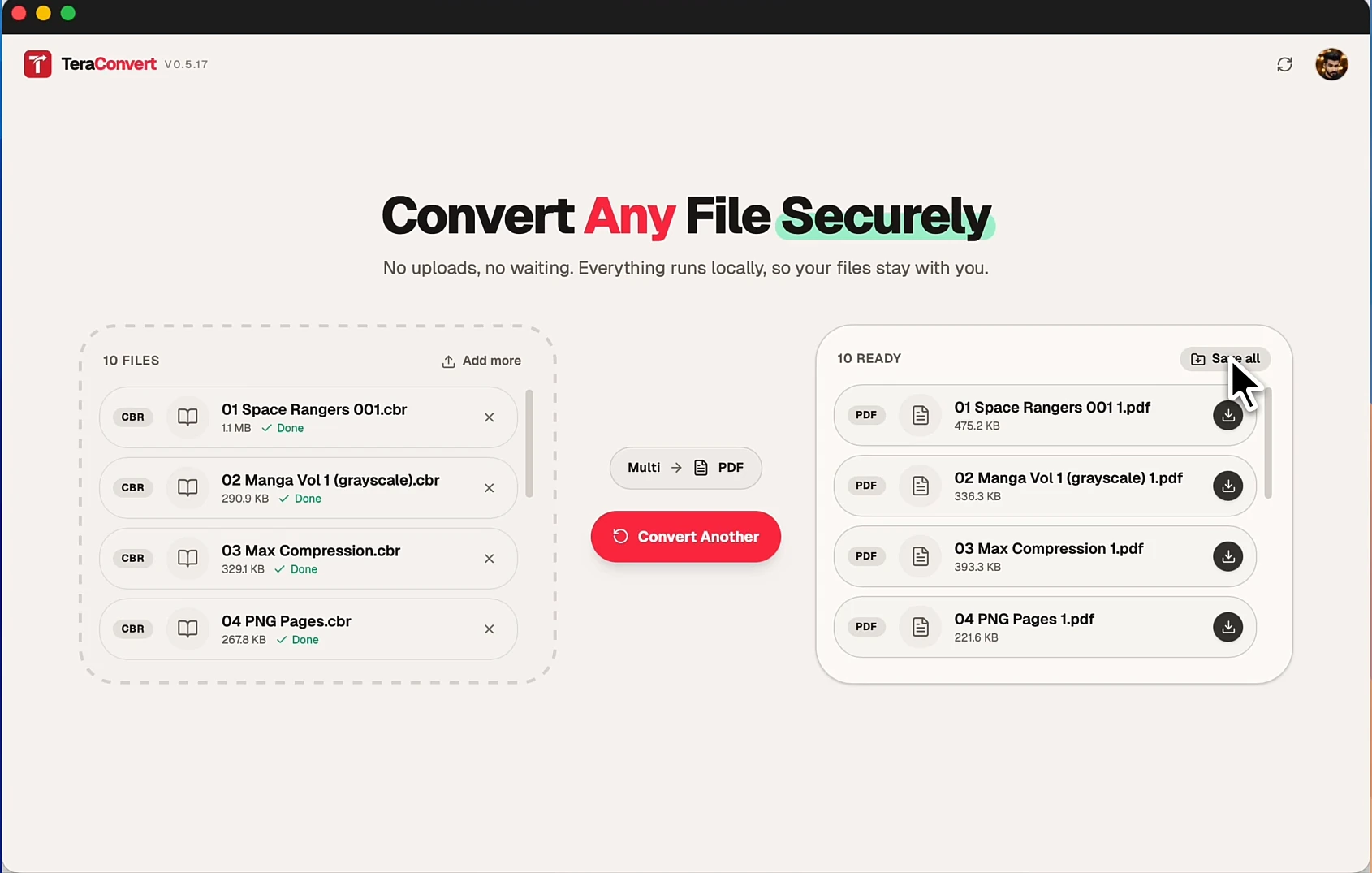
All ten came out in reading order. Eight and a half megabytes went in and the run took about thirteen seconds, so treat that as a smoke test rather than a benchmark, because a folder of four hundred megabyte scans will take real minutes and I would rather say that now than have you time it and feel lied to.
What you lose
The PDF will not be searchable, and the size can go either way
The field
Four routes that work, and one that costs you the files
Every one of these ends in a PDF. They differ on how many comics you can stomach doing it for, and on whether your scans go to somebody else’s server first.

TeraConvert
Drop the comics, pick PDF once, save the batch to Finder. Disclosure: I build it, so weigh the pitch accordingly.
Calibre
Free, open source, and the engine doing the actual work inside mine. The library manager around it is the part people bounce off.
The Unarchiver + Preview
Unpack the archive, select the pages in Finder, make a PDF. Free and fine once. Painful by the fifth comic.
Print to PDF
The advice every forum thread gives. It works perfectly, right after you solve the real problem, which is opening a CBR at all.

CloudConvert
Handles the format without any setup. Your comics go up to their servers to get there, and free tiers meter you by the file.
Route by route
The honest rundown
Calibre, if you already have it
Calibre is free, open source, and genuinely good at this. It is also the engine running underneath my app, so I am not going to pretend it is the inferior option. Add the CBR to your library, hit convert, choose PDF. The friction is everything around that: it wants to be a library manager for your whole collection, the conversion settings run several tabs deep, and doing it for eighty files means eighty trips through the same dialog. If you convert two comics a year, stop reading here and go install Calibre.
The Unarchiver plus a Quick Action
Rename a copy to .rar, or just open it with The Unarchiver, which handles the extension fine. You get a folder of numbered images. Select them in Finder, right click, Quick Actions, Create PDF, and macOS assembles them for you. Costs nothing beyond one free app. The catch is that it puts the page order entirely in your hands, which is exactly where the unpadded filename problem bites, and by the fourth issue you will be looking for a faster way.
An online converter
Fastest path to one PDF, and I would use one for a comic I downloaded off a public archive without a second thought. The trade is real though. Your files go up to a server to be converted, free tiers cap you by file count or size, and the original poster in that thread had too many manuals for that to be practical anyway. Convenience for one file, a bad deal for a folder.
What I built
TeraConvert is a Mac app that takes the whole folder at once. Drop the comics in, choose PDF a single time, and every issue converts locally through Calibre with a Save all that drops the results into a dated folder in Downloads. No account needed to drag files in, preview them, or pick a format. It is a one time purchase to actually convert, no subscription, with fourteen days to get your money back if it does not do what this page says.
Step by step
Doing it in the Mac app
Converting comics is a desktop job. Unpacking RAR needs a native engine, so this pair runs in the Mac app through Calibre and there is deliberately no browser version of it; a conversion we cannot honestly run in a tab does not get a button in a tab. The rest of the format list is split the same way, on purpose.
Install the app, and let it fetch Calibre
If Calibre is already on your machine it gets found and used. If not, the app offers to install it through Homebrew and picks the conversion back up on its own once that finishes.
Drop the whole folder in
Two or more comics switches the window into a batch view automatically. There is no per file setup and no queue to babysit.
Pick PDF once
The choice applies to every file in the drop. EPUB, MOBI, and AZW3 are in the same list if a Kindle is where these are going.
Hit Save all
Every PDF lands in a dated TeraConvert folder inside Downloads, and Finder opens on it so you are not hunting for anything.
Try it here
The converter, running in this page
This is the real web converter, not a screenshot of one. Drop a CBR on it and it will tell you the truth, which is that this one needs the Mac app. Drop a PNG, a MOV, or a Word file and it converts right here in the tab, with your file staying in the tab too.
Open your Network tab while it works. Your file never shows up in the list.
I was not going to recommend my own app on a hunch, so I built ten deliberately broken comics first and spent an evening trying to make it fail.
Decide fast
Which one you actually want
If you already run Calibre and you are converting three files this year, use Calibre. It is free, it is the same engine, and paying me for a wrapper you do not need would be silly. What I built is for the person in that Reddit thread, who has a folder of eighty manuals, no appetite for learning a library manager, and a strong preference for not mailing his files to a stranger’s server. Same conversion either way. The difference is how many times you have to do it by hand.
Questions
FAQ
How do I convert CBR to PDF on a Mac?
Use a tool that can unpack RAR, because that is what a CBR is. Calibre does it for free, one file at a time. TeraConvert does a whole folder in one drop and saves the PDFs straight to Finder. Both run on your Mac, so nothing gets uploaded.
Why will my Mac not open a CBR file?
Because macOS has never shipped RAR support. Archive Utility handles zip and a few relatives, and a CBR is a RAR archive with a different extension, so double clicking it does nothing useful. A CBZ is the zip version of the same idea, which is why that one sometimes opens and the CBR never does.
Can I convert CBR to PDF for free?
Yes. Calibre is free and open source and converts CBR to PDF directly. You can also unpack the archive with The Unarchiver and use the Create PDF quick action built into Finder. Both are slower per file than a batch converter, and both keep your comics on your Mac.
Will the PDF be searchable?
No. The pages inside a CBR are scans, meaning pictures of text rather than text, so the PDF inherits that. No converter changes it. OCR is a separate job, and in TeraConvert it reads printed page images into TXT, Markdown, or DOCX rather than working on the archive.
Does it handle CBZ too, and a whole folder at once?
Yes to both. CBZ and CBC convert the same way since they are the same pages in a different container, and you can send any of them to EPUB, MOBI, or AZW3 instead if you would rather read on a Kindle. Drop the folder and the app converts every issue in one run.
Does anything get uploaded?
No. The conversion runs on your Mac using tools installed on your disk. Pull the wifi before you convert and it keeps working, which is the fastest way to check that claim on any tool, mine included.
Convert the whole shelf at once.
Drop the folder, pick PDF, save the batch. Runs on your Mac, pay once, fourteen days to change your mind.
All product names, logos, and trademarks are the property of their respective owners. Calibre, The Unarchiver, CloudConvert, Homebrew, Reddit, Kindle, Preview, Finder, and macOS are referenced here for comparison and identification only. TeraConvert is not affiliated with, endorsed by, or sponsored by any of them.