
UK passport photo
For a paper application: line your head up, save the 35 x 45 mm photo and print it on a 4x6 sheet.
Choose your document
- Size
- 35 x 45 mm
- Digital file
- 413 x 531 px
- Head height
- 29 to 34 mm
- Background
- Light grey or Cream
Or drop it here. It stays on this device: nothing is uploaded anywhere.
- Face a window, with a plain light wall about a metre behind you.
- Ask someone to take it from 1.5 m away, phone at eye level, zoomed to 2x.
- Shoulders in the shot, face the camera, mouth closed.
- Never uploaded
- No watermark
- Free, no account
How to make a UK passport photo at home
Six steps with the real tool, and the photo never leaves your device.
Step 1
Choose your document and your photo
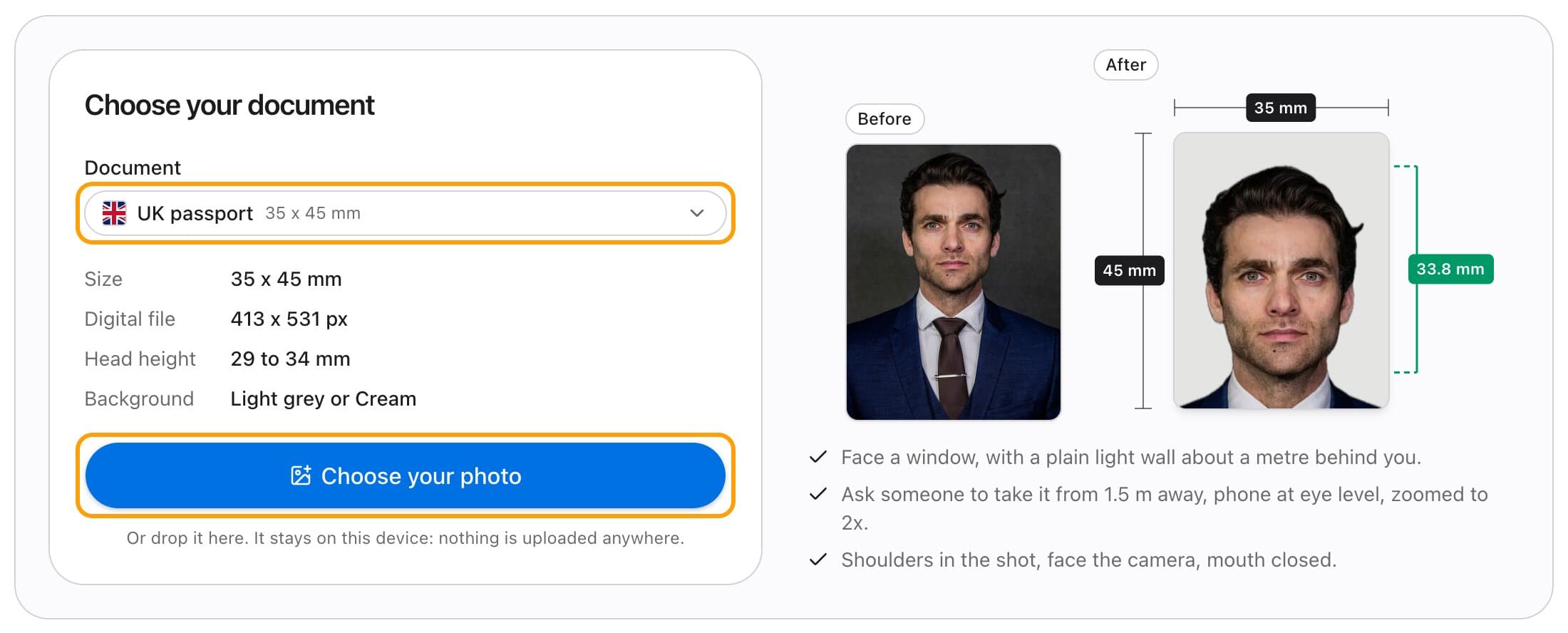
Pick UK passport and its rules appear beside it: 35 x 45 mm, a head of 29 to 34 mm, and a light grey or cream background. Then choose your photo, or drop it on the card. It stays on your device.
Take it against a plain light wall, facing the camera, with your shoulders in the shot. Ask someone else to take it: a selfie comes out mirrored and too close.
Step 2
Let it line you up
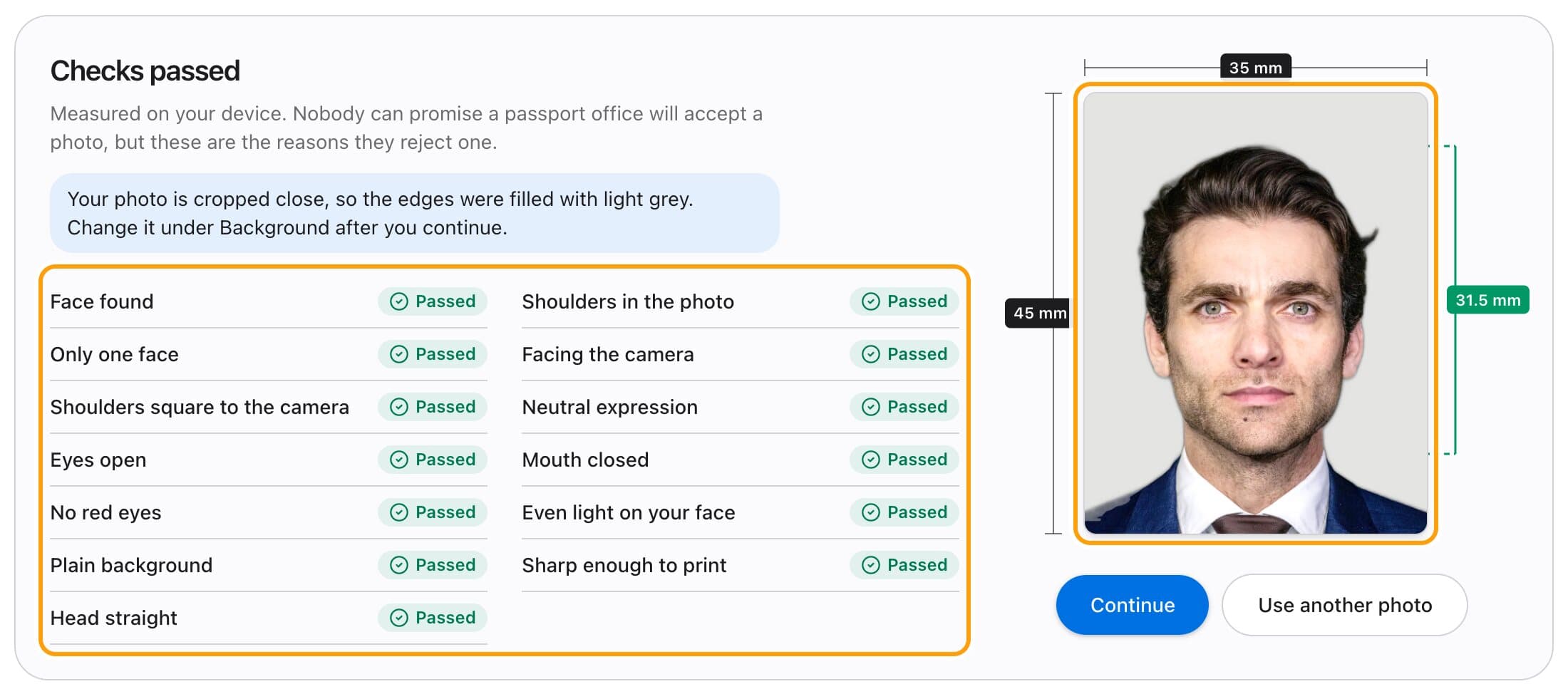
The tool finds your face, measures the top of your head and your chin, and crops to the UK passport rule: 29 to 34 mm from chin to crown on a 35 x 45 mm photo. A tilted head is levelled.
It balances the light, then checks what passport offices reject photos for: eyes open, mouth closed, facing the camera, no red eye, even light, a plain background, one face, enough detail to print. The green ruler shows your head height as it will print.
Step 3
Fine-tune if you want
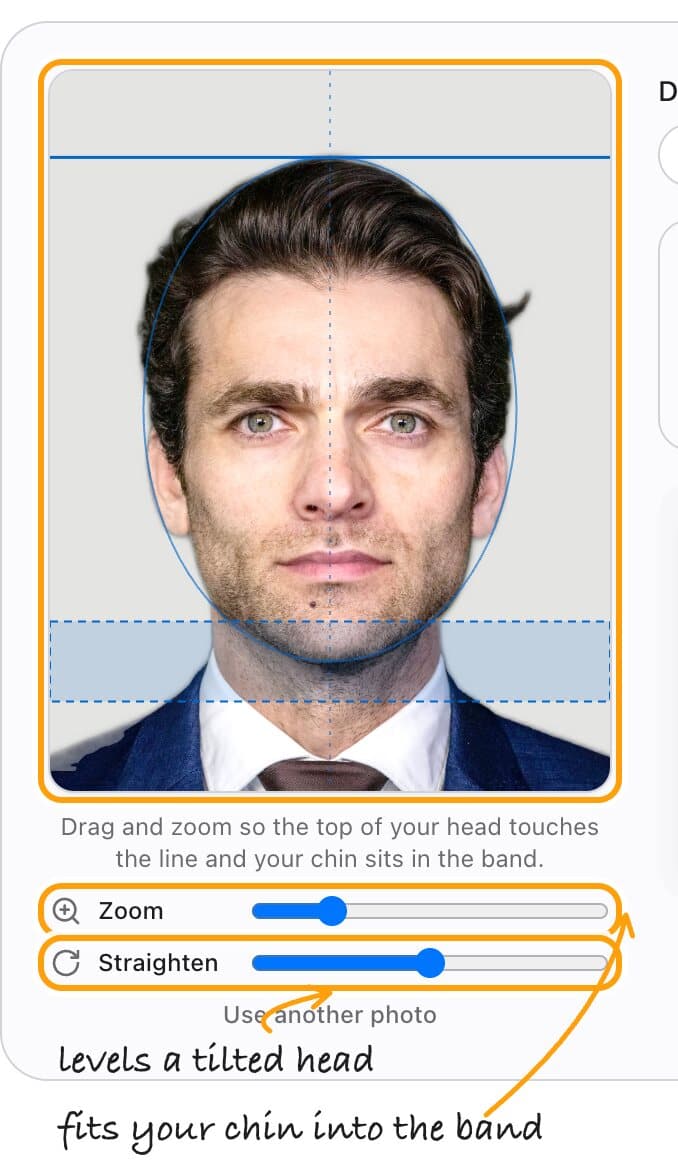
Most photos need nothing here. If you want it a little different, drag the photo, or use the two sliders.
Zoom changes the head size inside the shaded band, which is the UK passport limit. Straighten levels a head the tool could not.
Step 4
Fix the light and the background
Studio light is already on: the tool balances the colour against the wall behind you, brings your face to studio brightness and softens the shadows, the way a photo booth's lights would. The Light tab fine tunes it, and Reset takes it off. It never smooths skin or changes your face.
Wall not plain? On the Background tab, pick Light grey: you are cut out and placed on it, in your browser. A tick marks what a UK passport photo accepts: light grey or cream. The UK passport rules prefer an unedited photo, so when your wall and light are already good, leave both alone.

Step 5
Save the file
Save photo gives you a 413 x 531 px JPEG. That is the photo at print quality, 300 dpi.
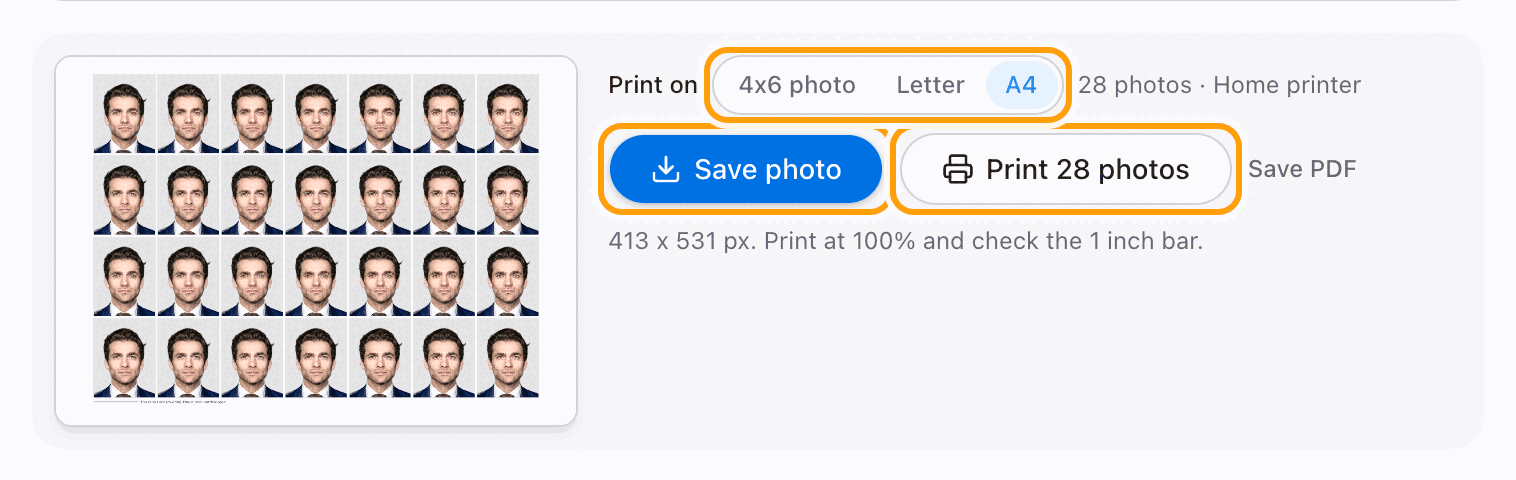
Need prints? Next to Print on, pick 4x6 photo, Letter or A4, then press Print. There is nothing to size: the page is already the paper.
Step 6
Print it
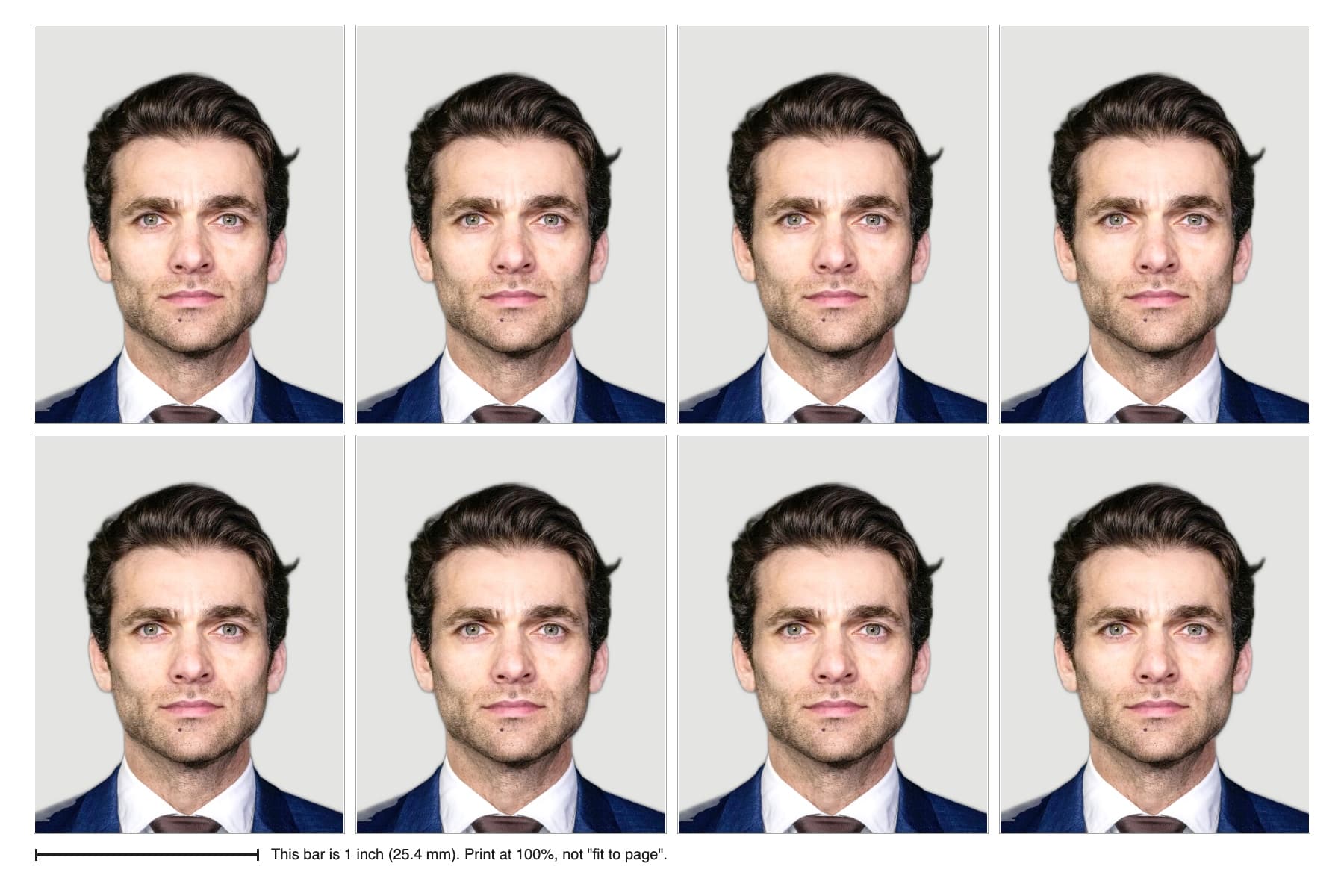
Pick the paper you have. A4 fits 28 photos and Letter fits 28, for your own printer. 4x6 photo fits 8, for a photo kiosk, which prints it for cents.
Print at 100% (Actual size). Check the 1 inch bar with a ruler, then cut along the marks. Every photo sits inside a margin, so a printer that trims the edge cannot make them smaller than 35 x 45 mm.
UK passport photo requirements
| Size | 35 mm wide x 45 mm high |
|---|---|
| Head | 29 to 34 mm, chin to the crown of the head (not the top of the hair) |
| Background | Plain cream or light grey. Not white |
| Expression | Plain expression, mouth closed |
| Glasses | Only if you have to wear them. No tint, no glare |
| Age of photo | Taken in the last month |
| Colour | Colour only |
Checked against the official pages on 2026-10-20: GOV.UK: Get a passport photo, HM Passport Office: Guidance for photographers. Rules change; your passport office has the final word.
How to take the photo
Most of what a photo studio gives you is light and distance. You can get both at home in two minutes.
1
Light
Face a window in daylight. Turn off the overhead bulb and the flash: one makes a yellow cast and shadows under the eyes, the other makes red eye.
2
Distance
Ask someone to hold the phone about 1.5 m away, at your eye level, zoomed to 2x. Up close, a phone lens makes your nose look bigger. Turn portrait mode off: its blur eats the edges of your hair.
3
Wall and pose
Stand about a metre in front of a plain light wall, so your shadow falls behind you and out of the shot. Shoulders square, face the lens, mouth closed, glasses off.
What we check before you save
Up to thirteen checks, plus visible ears for the documents that ask for them, measured on your device the moment you add your photo. Each is a reason passport offices send photos back.
- 01
Face found
Nothing else works without it, so this one comes first.
- 02
Shoulders in the photo
A photo cropped tight around the head cannot be framed to the rules. Your shoulders need to reach the bottom.
- 03
Only one face
A second person in the shot, even at the edge, gets a photo rejected.
- 04
Facing the camera
A turned head is the most common reason a home photo comes back. We measure where your nose sits between your cheeks.
- 05
Shoulders square to the camera
A selfie angles the body. Both shoulders should face the lens, level.
- 06
Neutral expression
Most offices want a relaxed, closed mouth and no smile. The US passport allows a closed smile, so it skips this one.
- 07
Eyes open
Both eyes, open and visible. A blink is a retake.
- 08
Mouth closed
Offices ask for a neutral expression; a wide smile or open mouth fails.
- 09
No red eyes
Flash red-eye is a rejection reason on its own. Take it without the flash.
- 10
Even light on your face
A shadow down one side of the face hides its shape. We compare your two cheeks.
- 11
Plain background
Patterns, doors and furniture behind you are out. We measure how busy the wall is.
- 12
Sharp enough to print
Blur and blown-up small photos are caught by measuring fine detail, not just pixels.
- 13
Head straight
A tilted head is levelled for you, up to 15 degrees.
- 14
Both ears visible
Only for documents that ask for it, such as the Chinese visa. A hair model checks that hair is not covering either ear.
No tool can promise a passport office will accept a photo, and we do not. The checks tell you what to fix before you print.
Get it right first time
Not white
UK print photos use a cream or light grey background. A bright white wall is not what HM Passport Office asks for.
Applying online? Don't crop
The online service asks for an uncropped photo of your head and upper body, at least 600 x 750 px. It crops it itself.
One month, not six
UK passport photos must be taken in the last month.
Your face stays on your device
Most passport photo sites upload your photo to their servers before you see a price, and keep it afterwards. This one runs in your browser: the face check, the background, the light and the print sheet all happen on your device, and the photo is never sent anywhere. It is also free, with no watermark and no account.
Questions
Can I use a photo I took myself?
Yes for a paper form, but HM Passport Office wants the photo unaltered by software and printed on professional photo paper.
Is my photo uploaded?
No. The crop, the background option and the print sheet all run in your browser. The photo never leaves your device.
Is it free?
Yes. No account, no watermark, no limit.
Can it change my background?
Yes. Pick White, Off-white, Light grey, Cream or Light blue and you are cut out and placed on it, in your browser. A tick marks the colours your document accepts. Some offices, the US and UK among them, prefer an unedited photo, so if your wall is already plain, keep Original.
Other passport and visa photos
- US passport photo
- US visa photo (DS-160)
- Green card lottery (DV) photo
- Schengen visa photo
- Indian passport photo
- Indian visa photo
- OCI card photo
- Chinese visa photo
- Vietnam e-Visa photo
- Thailand e-Visa photo
- Indonesia e-VOA photo (Bali)
- German passport photo
- Canadian passport photo
- 2 x 2 inch photo
- 35 x 45 mm photo
- 4x6 passport photo print