
Guides
Why Editing Text in a PDF Is So Hard

A PDF looks like a document. It does not think like one. It describes how a page should look rather than what the words mean, so your text arrives as runs of glyphs pinned to coordinates instead of sentences anyone can retype. That difference was baked in decades ago so a file would print the same everywhere, and it is the reason the document you can read perfectly is a document you cannot change.
If you just came to fix a file
You can edit one right now
Most PDF editors do not change your words. They cover them.
The root problem
A PDF describes a page, not sentences
Open one in a text editor and you will not find your document. Here is a real page from my own passport paperwork, opened as plain text.
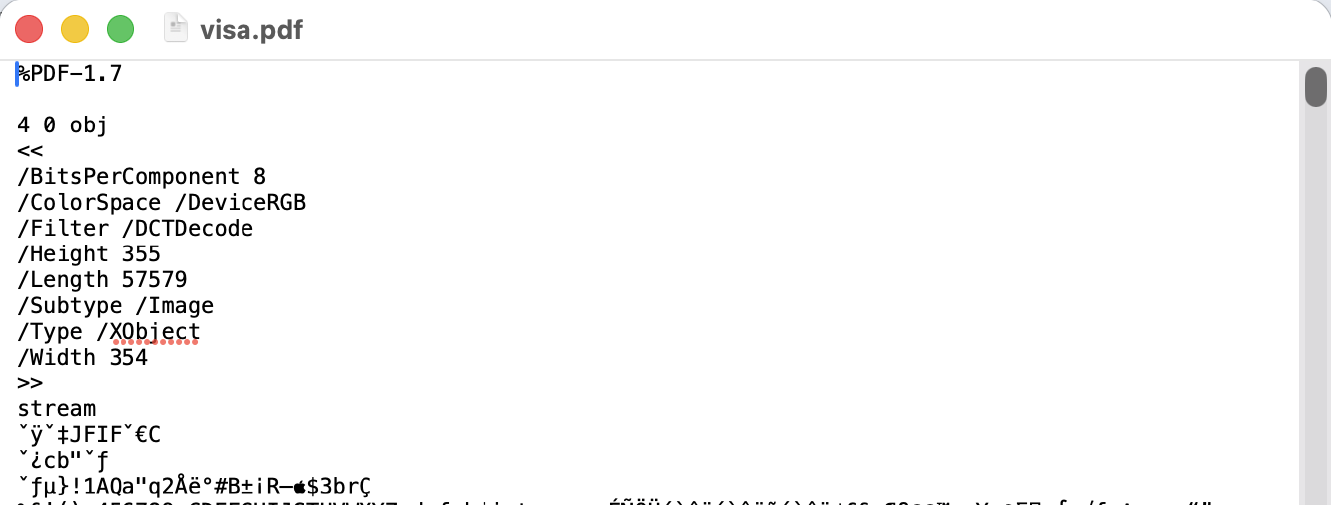
That is the honest answer to why you cannot just edit it: most of the file is compressed, so the words are not sitting there as words even before you ask what a line is. Decompress the page and the instructions do appear, and they are stranger than most people expect.
BT
/F5 28 Tf
1 0 0 -1 0 56 Tm
(1) Tj
/F6 28 Tf
27.001953 0 Td <a6> Tj
/F7 28 Tf
17.212891 0 Td <07> Tj
/F6 28 Tf
8.640625 0 Td <92> Tj
A page from a PDF printed by Chrome, run through qpdf to uncompress the stream.
The vocabulary is tiny. Tf picks a font and a size, Td moves sideways by an exact number of points, Tj paints. So a line of text is not a line of text; it is a sequence of jumps and stamps. Notice what is being stamped, too. Not letters, but numbers like a6 and 07, which are positions inside a font rather than characters, and the font itself changes on almost every glyph.
So before my editor can let you click anything, it has to rebuild the idea of a line from scratch. The rule is simple enough: when a character sits more than half a font size below the last one, that is a new line. Then there is the awkward case. Table cells and label columns share one baseline, and if you treat the whole row as a single line, correcting one number rewrites the entire row and anchors it back at the first column.
My answer is a gap threshold of one and a half ems. Ordinary word spaces run around a quarter to a third of an em even in stretched, justified text, so a gap that wide is never a space between words; it is the start of the next cell. Edit the amount in a table and the label beside it stays exactly where it was.
The shortcut everyone takes
Covering the words is not editing the words
Try the free PDF editors and watch what happens when you fix a name. A white rectangle appears where the old name was, and your new one is drawn on top. On screen it is perfect. In the file, both names are now present, one hidden behind a shape.
This matters more than it sounds. Select the whole page and copy it, or run any tool that pulls text out of a PDF, and the original comes straight back out from under the box. People have sent contracts, offers and medical forms into the world believing the old figure was gone, and it was sitting there the entire time, one keyboard shortcut away from anyone who bothered to look.
I had a whiteout tool in an early version. I deleted it. Keeping a feature whose entire job is to make a document look corrected without correcting it felt like handing someone a lie and calling it a shortcut.
Worth knowing
A white box is not a redaction
The part nobody expects
The font in your PDF is not the whole font
Here is the constraint that shapes everything else. When a document is exported to PDF, the fonts it uses are almost always subsetted. Only the letters that actually appear get embedded, and the font gets a six letter prefix in front of its name to mark it as a partial copy.
Which means retyping is a problem before it starts. Your invoice says Arial, but the Arial inside it may hold thirty glyphs, and the moment you type a letter the document never used, there is nothing to draw. This is not a limitation I invented my way around. It is why Acrobat swaps in a font from your system when you edit, and why your corrected line sometimes ends up looking slightly wrong.
The industry answer is metric compatible substitution, and I ship six of them: Arimo stands in for Arial, Tinos for Times New Roman, Carlito for Calibri, Caladea for Cambria, Gelasio for Georgia, Cousine for Courier New. These are open fonts drawn to occupy exactly the same width per character as the ones they replace, so a retyped line takes up the same space it always did and nothing further down the page shifts. They live on my own domain and load from there, so editing a private document does not put a request to a font CDN in your network tab.
One trap took me a while. I first read boldness from the weight number the file declares, and lines that looked perfectly normal came back bold. Exporters guess that number from the thickness of the letter stems and stamp ordinary text at 600 without blinking. So the weight only counts from 700 up, and the honest signal turns out to be the font name itself, which keeps the word Bold in it even after subsetting.
The fix
What happens when you retype a line
Two copies of your document are open at once. One is the page you see and scroll. The other is a shadow copy where the real surgery happens, and keeping them separate is what stops the view jumping around every time you correct a word.
You click a line
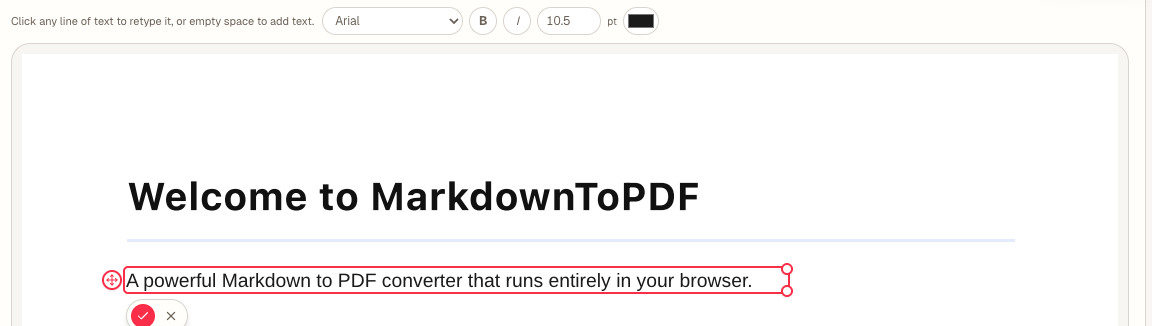
An input box opens on top of it, already carrying the original size, colour and a font matched to the original.
The old words come out
The drawing objects that painted that line are removed from the page, not covered. This happens on a second copy of your document held in memory, so what you are looking at never flickers.
The new words go in
A fresh text object is inserted at the same baseline with the replacement font embedded in the file, and the page is rewritten around it.
Only that patch repaints
The edited strip is redrawn over the page you are already reading. No reload, no scroll jump, no waiting for a whole document to render again.
Redaction runs on the same idea. Instead of a black bar, a marked region is filled with the colour the page uses most in that spot, sampled from your own document, so a removal on a tinted form or a coloured table cell reads as an erasure rather than a censor mark. You can override the colour if you want the bar.
The honest part
Where it says no, and why I left it that way
Some lines refuse to open. That is deliberate, and it took more work than letting them open would have. An editor that accepts every click and mangles one page in twenty is worse than one that tells you up front which lines it can handle.
Text on a slant
Rotated or vertical lines are read only. If a line's box is more than 2.5 times taller than its font size, it is not running left to right, and retyping it would write your correction sideways across the page.
Squeezed text
Some documents squash letters horizontally to make a line fit. A retyped line cannot reproduce that squeeze, so those stay locked rather than quietly changing shape on you.
Shared drawing objects
Sometimes one object in the file paints characters on several lines at once. Removal happens per object, so every line it touches goes read only. Rare, and worth it.
Scans
A scanned page has no text in it at all, just a picture of text. Nothing to click, nothing to retype. That is an OCR job, not an editing job.
Try it
Open one of your own PDFs
Drop a file below and click a line. The engine runs in this tab, on your machine, and the file is never sent anywhere. Editing and previewing are free with no account; downloading the corrected file is the step that eventually asks for one.
Choose a PDF
Or drop one here.From your files, downloads, or wherever it landed.
Your file stays on this device
The same editor has a home of its own on each platform, if you would rather start there next time: the PDF editor for Mac, the one for iPhone where you tap a line instead of clicking it, the Android one, or the plain web version. If you are joining files rather than fixing them, merging PDFs runs on the same engine.
Questions
Questions I get asked
Does my PDF get uploaded anywhere?
No. The engine that opens and rewrites the file is code running inside your browser tab. There is no conversion server here to upload anything to, which is also why the page keeps working when your connection drops halfway through.
Can I edit a scanned document?
Not by clicking it, because a scan is an image and there is no text in there to catch. Convert it to text first and the pages get read as pictures automatically, no button to find. There is a page cap of ten here; longer scans are what the Mac app is for.
Will the corrected line match the original exactly?
The width will. Character widths are matched to the original font, so your line occupies the same space and the layout around it holds. The letter shapes are very close rather than identical, and on a line you have retyped in a paragraph of unedited text, almost nobody sees the difference.
Does this work on a phone?
Yes. Tap a line instead of clicking it, type your correction, tap the tick. Two fingers still pan and pinch the page normally, because the tools that need a finger drag are the drawing ones, and text editing is not one of them.
One last thing
Why I bothered
I built this because I wanted to change one wrong date on a form and could not do it without either paying a subscription or handing the document to a website I knew nothing about. Neither felt reasonable for a nine character fix. So the words come out properly, the file stays on your machine, and you pay once if you keep using it.
Open the PDF editor and put a real file through it. That is the only review that counts.