Privacy
Is CloudConvert Safe? What Actually Happens to Your Files

Nobody types is CloudConvert safe idly. You type it with a file already selected, and something about that file makes you hesitate for a second before you drop it into a website. A contract. A scan of a passport. A folder of client photos.
So instead of reading the privacy policy at you, I uploaded one of those files and watched where it went. A sample passport scan, no account, browser devtools open. What follows is the route it actually took, what the company publishes about that route, and the three things it quietly does not claim.
I should say plainly that I build a competing converter, so read this with the appropriate squint. I have tried to make that bias harder to hide by quoting their pages verbatim and by telling you where CloudConvert comes out ahead.
CloudConvert is not the risk. Uploading is the risk, and CloudConvert is one of the more careful places to do it.
The short answer
CloudConvert is safe, with one structural caveat
CloudConvert is safe for ordinary files. It is run by Lunaweb GmbH, a real company in Grünwald, Germany. Its information security management system holds an ISO 27001 certificate from TÜV Süd. Its privacy policy states files are deleted at the latest after 24 hours and that the company does not read, look into, or mine them. No breach of the service is listed in Have I Been Pwned. That is a better paper trail than most of the category manages.
The caveat is not a flaw in CloudConvert. It is the shape of the thing. Converting on CloudConvert means your file travels to a server and sits there for a while, and no amount of certification changes the fact that a copy existed somewhere you do not control. For a meme, who cares. For a document under privilege, that copy is the whole problem, and the question stops being about CloudConvert at all.
If you want the feature-by-feature version rather than the security one, I keep a side-by-side comparison of CloudConvert and TeraConvert with pricing and format counts.
Original test, 8 August 2026
What actually happens when you convert a file
A sample passport scan, JPEG in and PNG out, on cloudconvert.com with no account and the network panel recording. Four requests matter.
A session opens before you touch anything
The moment the converter page loads, the browser asks cloudconvert.com for a session and gets one back. No account, no sign-in. This is ordinary web plumbing, not tracking, but it is the first request and worth naming so the sequence is complete.
A job is created on the API
Choosing a format and pressing convert sends a request to api.cloudconvert.com describing the work: this input format, this output format, this operation. Still no file. This is the paperwork.
Your file leaves your machine
Then the file body itself is posted to eu-central.storage.cloudconvert.com. This is the moment people are actually asking about when they ask whether CloudConvert is safe. The bytes of your document are now on hardware you do not control.
The result comes back from storage, not from your computer
Conversion finishes server-side and the page renders a download link pointing back at that same storage host. Your converted file lives there, waiting, until you fetch it or the clock runs out.
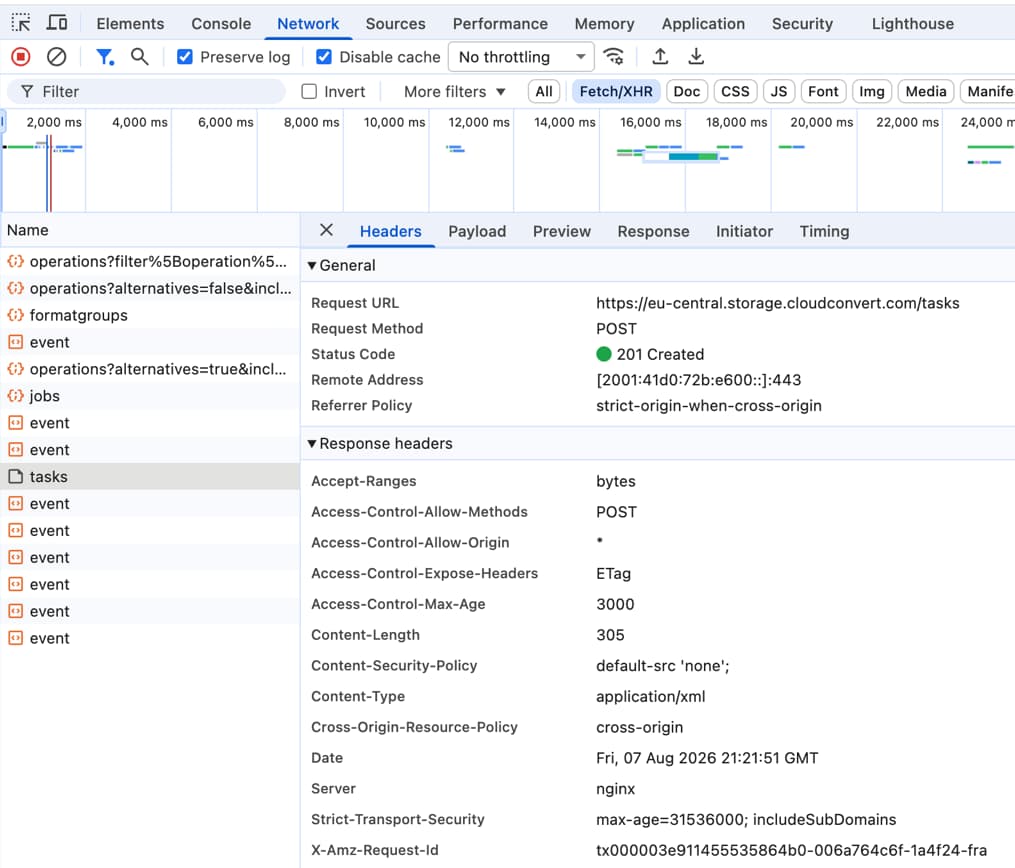
None of this is hidden or sinister. It is simply how a server-side converter has to work, and CloudConvert describes it accurately in its own policy: your selected files are transferred to and temporarily stored on CloudConvert's servers. I am showing you the packets because the sentence is easy to skim past and the packets are not.
Their own pages
What CloudConvert claims, and what it does not
The interesting column is the second one. Most write-ups on this question list the reassuring claims and stop there. The gaps are more useful, and they are not accusations, they are simply the boundary of what the company has put in writing.
| Property | Status | What their page actually says |
|---|---|---|
| Encryption in transit“All transfers from and to CloudConvert are SSL encrypted.” | Claimed | “All transfers from and to CloudConvert are SSL encrypted.” |
| Encryption at restNo at-rest encryption claim appears on the security page or the privacy policy. Absence of a claim, not evidence of unencrypted disks. | Not claimed | No at-rest encryption claim appears on the security page or the privacy policy. Absence of a claim, not evidence of unencrypted disks. |
| ISO 27001The ISMS of Lunaweb GmbH, certified by TÜV Süd. Company-level scope, not a per-service statement. | Certified | The ISMS of Lunaweb GmbH, certified by TÜV Süd. Company-level scope, not a per-service statement. |
| SOC 2I found no SOC 2 claim on cloudconvert.com/security or /privacy on 8 August 2026. Some third-party vendor directories list one anyway. | Not claimed | I found no SOC 2 claim on cloudconvert.com/security or /privacy on 8 August 2026. Some third-party vendor directories list one anyway. |
| Files read or mined“We do not read, look into, or mine any data from your files, and we do not make any copies of them.” | Denied | “We do not read, look into, or mine any data from your files, and we do not make any copies of them.” |
| Staff access“Each conversion runs in a separate, isolated container.” | Isolated | “Each conversion runs in a separate, isolated container.” |
| Data processing agreementNot self-serve. You contact them and ask. | On request | Not self-serve. You contact them and ask. |
| HIPAA business associate agreementNo BAA offering appears anywhere on their site. | Not published | No BAA offering appears anywhere on their site. |
| Processing regionSecurity page: “Our cloud services are hosted in the selected geographical processing region exclusively.” Privacy policy: “Selection of the geographically nearest server location.” Both are theirs. | Unclear | Security page: “Our cloud services are hosted in the selected geographical processing region exclusively.” Privacy policy: “Selection of the geographically nearest server location.” Both are theirs. |
The gap worth knowing
Encrypted on the way there, unstated once it arrives
Checking a claim
The 24-hour window, and how I verified it
The retention sentence gets repeated everywhere. Files are deleted immediately when you press the delete button, and automatically at the latest after 24 hours. Fine, but it is their sentence about their servers, and you cannot see inside their servers.
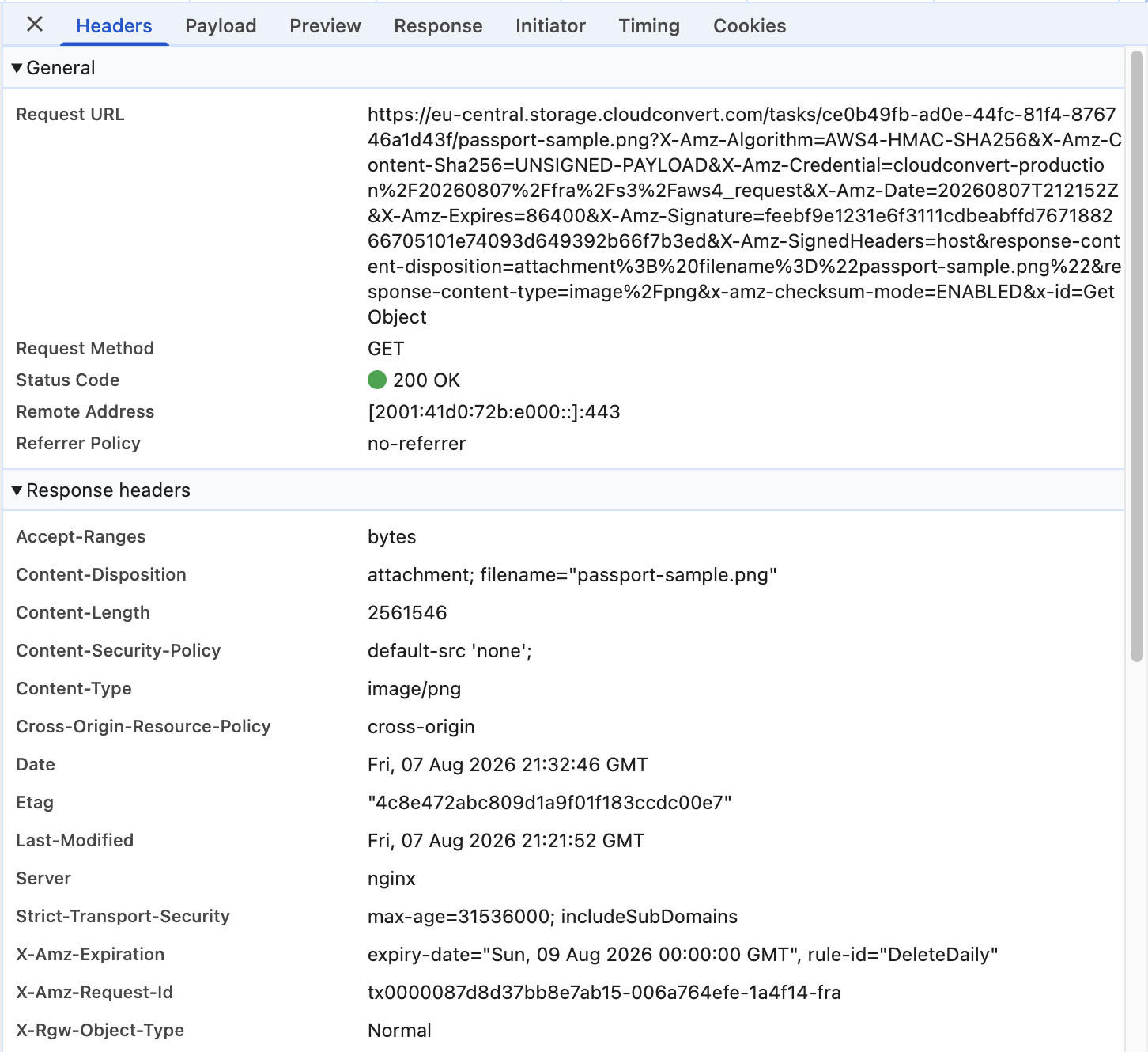
What you can see is the download link. When the conversion finished, the page handed me a pre-signed storage URL, and pre-signed URLs carry their expiry in plain sight. This one said X-Amz-Expires=86400. Eighty-six thousand four hundred seconds is exactly 24 hours. The credential in the same URL carried the region code fra, for Frankfurt.
That is not proof of deletion. It is an independent number, generated by their infrastructure rather than written by their lawyers, that lines up exactly with the policy. Small thing. I found it more convincing than the policy sentence.
Then I read further down the same response and found something better, which also complicates the first number. The storage layer returned a lifecycle header: X-Amz-Expiration: expiry-date="Sun, 09 Aug 2026 00:00:00 GMT", rule-id="DeleteDaily". That is the storage itself announcing when it intends to delete the object, and the rule has a name.
This is stronger evidence than the link expiry, because a signed URL going stale only means the link stops working. A lifecycle rule means the file is scheduled to go. It is also not 24 hours. Both timestamps in that response are stamped GMT, so there is no timezone to argue about: my upload was logged at 21:21:52 GMT on 7 August and the deletion was set for 00:00:00 GMT on the 9th. That is 26 hours and 38 minutes.
So I did it again, 55 minutes later, with the same file. Second upload, second job, second storage object. The lifecycle header came back with the identical expiry-date, to the second: 00:00:00 GMT on 9 August. Two files uploaded almost an hour apart, both scheduled to die at the same instant.
That is what tells you it is a boundary rather than a countdown. The rule takes your upload time, adds a day, then rounds up to the next midnight UTC. Which means the window is not 26 hours either. It slides with the clock: upload just before midnight and you get roughly 24 hours, upload just after and your file is scheduled to sit there for nearly 48.
I would not call that a broken promise. It is a nightly sweep rather than a per-file timer, CloudConvert's own job cleanup may well remove files earlier than the backstop I can see from outside, and pressing the delete button removes the file immediately, which is the part they document most clearly. But the published number is 24 hours at the latest, and the only deletion signal I could observe from outside was scheduled past it.
Practical consequence
That download link is a password
Data residency
Where your files sit depends on where you are
This is the part I found least well covered elsewhere, and it matters more than most of the rest. A German company implies German servers implies GDPR protection. That chain breaks in the middle, and where it breaks depends on your own IP address.
CloudConvert's own subprocessor list names three German hosts, Amazon Web Services EMEA, OVH GmbH in Cologne and Hetzner in Gunzenhausen. It also names OVH US LLC at 11480 Commerce Park Drive in Reston, Virginia. The privacy policy is explicit that routing follows the visitor: the geographically nearest server location is selected, and US visitors are served from US infrastructure.
So an American reader worried about a confidential file is most likely having it processed in Virginia, under US legal process, by a German company. My own test connection came from neither region and landed on their EU storage host, which is consistent with the same rule.
There is also a small contradiction the company should probably tidy up. The security page says services are hosted in the selected geographical processing region exclusively, which implies you choose. The privacy policy says the nearest server is selected for you. On the free web converter I found no region selector at all.
Also worth knowing
The file goes in 24 hours. The metadata stays longer.
Setting the record straight
About that FBI warning
It gets cited in every thread about converter safety, usually by someone who has not read it.
In March 2025 the FBI's Denver field office issued a public notice about free online document converter tools being used to deliver malware, with ransomware as one outcome. Reporting at the time quoted the advisory describing converters that do the advertised job while the resulting file carries hidden malware.
Here is the part that gets dropped. The advisory was about fraudulent lookalike sites, not established services. It named no legitimate converter, and it did not mention CloudConvert. The technique it described was impersonation: register a domain one letter off a real one, rank it, and wait. Security researchers publishing malicious domain lists alongside that story included convertscloud, a near-miss on CloudConvert's own name. That domain list was published by Malwarebytes alongside the advisory coverage, not by the FBI.
Read honestly, that advisory is an argument for using a known provider with a published address and a real certificate, rather than clicking the third ad in a search result. It is not evidence against CloudConvert. One caveat on my sourcing: fbi.gov blocked every automated request I made, including from a real browser, so the wording above comes from contemporaneous reporting by BleepingComputer and Help Net Security in March 2025 rather than from the advisory itself.
The real dividing line
When you should not use any online converter
Not a scare list. These are cases where the rule is external to you, so your personal comfort with the vendor is not the deciding input.
Client files under privilege
The duty does not end when you pick a good vendor
Anything with health data in it
No business associate agreement, no upload
Read the terms once
If it goes wrong, the remedy is nothing
The wider trend
Every extra party is another door
This is the argument that has nothing to do with CloudConvert specifically, and it is the one I find most persuasive.
Verizon's Data Breach Investigations Report has tracked third-party involvement in breaches climbing across three consecutive editions, reaching 48 percent in the 2026 report. The 15 and 30 percent figures come from the 2025 edition, which reported the jump itself. IBM put the global average cost of a breach at 4.99 million dollars in its 2026 study, with AI-enabled breaches running about a million higher. Both figures come with real caveats, since each is drawn from contributed or self-reported data rather than a random sample, and the contributor mix shifts between editions.
The direction still says something simple. Most organisations are not breached directly any more. They are breached through somebody they handed data to. Every service in your chain is a service whose worst day becomes your worst day, and the only way to remove a link is to not add it.
The other option
Convert without uploading anything
Here is my pitch, once, and then I will stop. TeraConvert is the converter I built because I got tired of this exact decision.
The web version converts inside your browser tab. The Mac app converts with engines installed on your own disk, the same open-source tools that do the heavy lifting nearly everywhere: FFmpeg, ImageMagick, Ghostscript, Pandoc. There is no upload step because there is no server to upload to, which also means no retention window, no subprocessor list and no data residency question to think about.
It is not strictly better. CloudConvert has a real API, runs on any operating system, and handles enormous single files on its paid tiers. My desktop app is Apple Silicon Macs only right now. If you need a conversion API in a backend pipeline, use theirs, honestly.
Do not take the privacy claim on trust either. Turn off Wi-Fi and convert something. It is a ten-second test and it works on any tool that claims to run locally, including mine.
Download TeraConvert for Mac or convert a file in the browser. Your first browser conversion runs without an account, including common jobs like HEIC to JPG and PDF to DOCX. After that it asks you to sign in, which is the honest version of a free tier.
The verdict
So, is CloudConvert safe?
The answer depends on the file, not on the company. Sort your file into one of these three and the decision makes itself.
Use CloudConvert
Public or throwaway files
A file you would happily email to a stranger loses nothing by spending up to a day on someone else's server. Take the tool with the better format support and get on with your day.
Your call
Personal but not sensitive
Nothing here breaks a rule. It comes down to whether you mind a copy of your own life sitting in someone else's storage bucket for up to a day. Reasonable people answer this differently.
Convert locally
Confidential or regulated
Not because CloudConvert is careless. Because the paperwork that would make the upload defensible, a signed BAA or a documented vendor review, usually does not exist for a tool you found in a search result.
Two of those three say use CloudConvert, which I want to state plainly since I sell the alternative. For most files most of the time, a well-run German service with an ISO 27001 certificate and a 24-hour deletion policy is a perfectly sensible place to send a file, and it supports formats my browser version cannot touch.
The third case is the one worth changing your habit for, and it is not about trusting CloudConvert less. It is that trust is the wrong instrument. A file that never leaves your machine does not need anyone to be trustworthy, does not care where Virginia is, and has no expiry to keep track of.
Questions people actually ask
Frequently asked questions
Is CloudConvert safe?
For ordinary files, yes. It is operated by Lunaweb GmbH in Grünwald, Germany, its information security management system is ISO 27001 certified by TÜV Süd, it states that files are deleted at the latest after 24 hours, and it states that it does not read, look into, or mine your files. No public breach of the service appears in Have I Been Pwned. The caveat is structural rather than a criticism: converting on CloudConvert means uploading, and some files should not be uploaded to anyone.
Is CloudConvert legit, or is it a scam site?
It is legitimate. The company publishes a named legal entity and address, names its hosting subprocessors, and holds an ISO 27001 certificate from TÜV Süd. The confusion usually comes from the FBI Denver advisory in March 2025, which warned about fraudulent lookalike converter sites, not about established services. One of the malicious domains Malwarebytes listed alongside that story was convertscloud, a near-miss on CloudConvert, which is exactly the trap the advisory was describing.
How long does CloudConvert keep my files?
Its privacy policy says files are deleted immediately when you press the delete button, and automatically at the latest after 24 hours. Testing that, I found two signals. The signed download link expires after 86,400 seconds, exactly 24 hours. But the storage response also carried a lifecycle header scheduling my file for deletion by a rule named DeleteDaily, and both timestamps were in GMT: uploaded 21:21:52 on 7 August, scheduled for deletion at midnight on the 9th, which is 26 hours and 38 minutes. That is a nightly sweep rather than a per-file timer, so the window slides between roughly 24 and 48 hours depending on what time you upload. Separately, log data such as IP address and user agent is kept for 180 days, and billing records fall under a German statutory retention period of up to 10 years.
Are my files processed in Germany?
Not necessarily. CloudConvert's subprocessor list includes OVH US LLC in Reston, Virginia alongside its three German providers, and the privacy policy describes selecting the geographically nearest server location, with US visitors served from US infrastructure. So a US-based user's files are likely processed in the United States and subject to US legal process, even though the company itself is German. My own test connection, made from outside both the US and the EU, was routed to their EU storage host.
Is CloudConvert safe for confidential or legal documents?
That is a question about your obligations, not about CloudConvert's competence. Illinois State Bar Opinion 16-06 says a lawyer may use cloud services provided reasonable measures are taken, and that the duty does not end once a reputable provider is chosen. For health data, 45 CFR 164.504(e) requires a business associate contract with any vendor that handles protected health information, and CloudConvert publishes no BAA offering. Converting the file locally removes the question entirely.
Has CloudConvert ever been breached?
No breach involving cloudconvert.com is listed in Have I Been Pwned. I also searched public CVE records and security news reporting and found nothing. That is the scope of what I checked, and it is the absence of a disclosed breach rather than proof of a perfect record, because undisclosed incidents are undisclosed by definition.
What is the safest way to convert a private file?
Convert it on your own machine so there is no upload to reason about. Browser-based converters that run the conversion in the tab never send the file anywhere, and a desktop app converts with binaries already on your disk. The reliable test for any tool making that claim, mine included, is to turn off Wi-Fi and try it.
Last thing
The safest file is the one that never left
I went into this expecting to find something damning and did not. CloudConvert publishes its address, names its subprocessors, holds a real certificate, and its download links expire exactly when it says they do. It has earned the benefit of the doubt that most of this category has not.
What I would change is the question. Not can I trust this company, which is unknowable and has to be re-answered every time the company changes hands. Rather does this file need to go anywhere at all. For a surprising share of conversions the answer is no, and once you notice that, the first question stops mattering.
If you want the pricing and format breakdown, that lives in the CloudConvert comparison. If you want the wider roundup of local converters, I tested those in the best private file converter for Mac.
 Sources, all read 8 August 2026
- CloudConvert privacy policy (revised 17 April 2026)
- CloudConvert security and compliance
- CloudConvert terms of service (April 2022)
- CloudConvert ISO 27001 certification announcement
- Have I Been Pwned, breach search for cloudconvert.com
- FBI Denver, online file converter scam advisory (March 2025)
- BleepingComputer reporting on the FBI advisory
- Help Net Security reporting on the FBI advisory
- IBM Cost of a Data Breach 2026
- Verizon Data Breach Investigations Report 2026
- Verizon Data Breach Investigations Report 2025
- Illinois State Bar Association Opinion 16-06
- ABA Formal Opinion 477R
- ABA Formal Opinion 483
- 45 CFR 164.504(e), business associate contracts